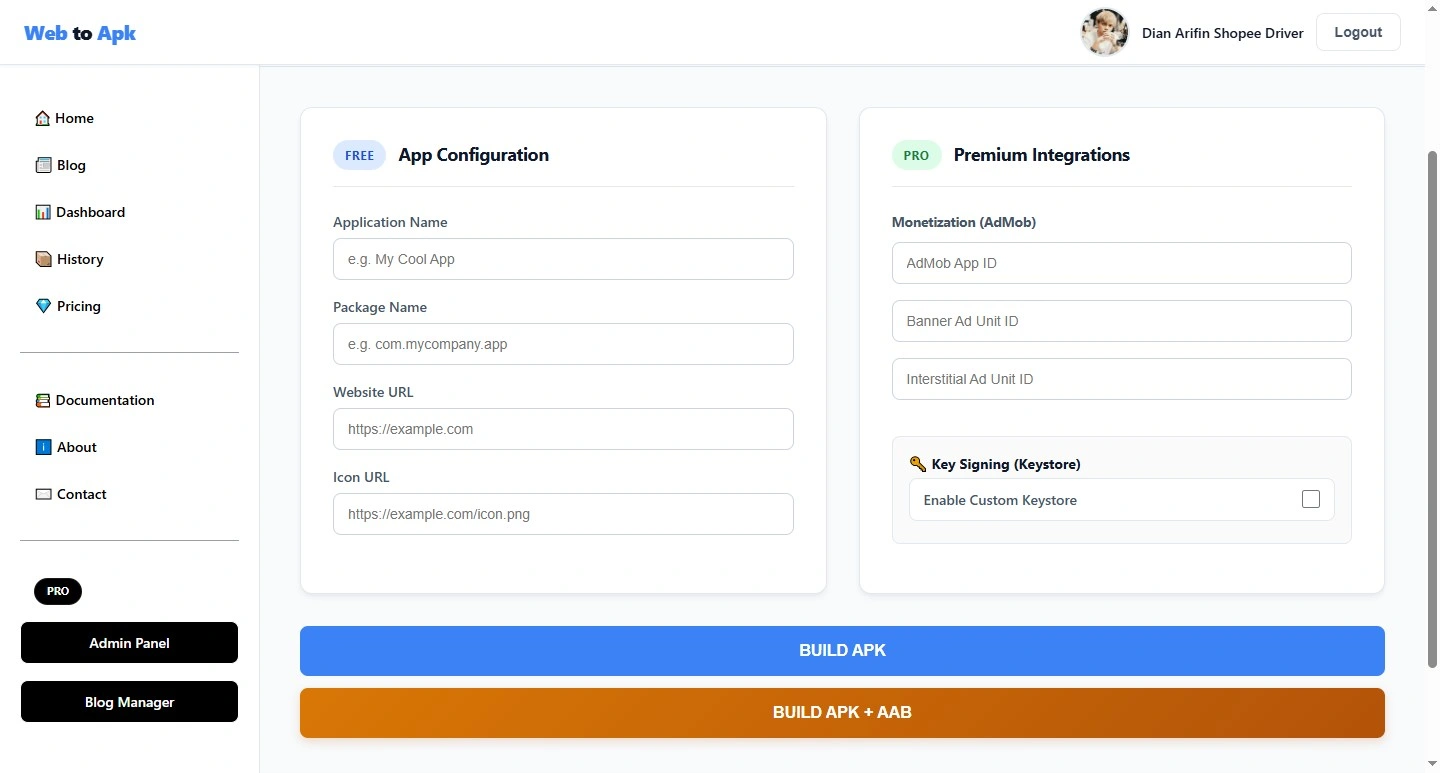
In today's mobile era, many website owners want to present their sites as Android apps for easier user access. This is where the web to APK builder solution was born: an APK generator tool that transforms websites into apps without the need for complex coding. With this system, you can create Android apps from your website quickly, efficiently, and flexibly for your business, portfolio, online store, blog, or landing page needs.
Web to APK Free Builder is the solution for anyone who wants an Android app from their own website. There's no need to build an app from scratch, no need for in-depth Java or Kotlin knowledge, and no need to hire a large development team. Simply enter your website data, select the required settings, and the system will help generate a ready-to-use APK file.
What do you get with the Free, Pro 1 Month, and Lifetime plans?
Every user has different needs. Therefore, this system is designed with several plan options for greater flexibility. Below is an explanation of the benefits of each plan.
1. Free Plan
The Free plan is suitable for users who are just starting out or want to create simple APKs from their website. With this plan, users get basic access to create apps with a limited number of builds. This is very useful for testing, feature validation, or other light-duty needs.
The Free plan is typically the choice for:
- Custom App Name
- Custom Package Name
- Input URL Website
- Custom Icon
- Build APK
With the Free plan, users can still experience the APK creation process without committing to a subscription. This is an important first step before upgrading to a larger plan.With the Free plan, users can still experience the APK creation process without committing to a subscription. This is an important first step before upgrading to a larger plan.
2. 1-Month Pro Package
The 1-Month Pro Package is intended for active users who require more APK builds within a specific period. This plan is suitable for developers, agencies, businesses, or owners of multiple websites. With this plan, users receive a larger APK creation quota than the Free plan.
The advantages of the Pro plan are:
- All Features Are Free
- AdMob App ID
- Banner Ads
- Interstitial Ads
- Custom Keystore
- Build APK + AAB
Monthly plans are ideal for users who want full access for a short period without a long-term commitment. This is an efficient option if your needs are limited to projects, promotional campaigns, or short-term application development.
3. Lifetime Plan
The Lifetime Plan is the most practical option for users who want long-term access without the need for monthly renewals. After purchasing a Lifetime plan, users can use the service continuously according to the system's terms and conditions.
This plan is ideal for:
- All Member Features
- AdMob App ID
- Banner Ads
- Interstitial Ads
- Custom Keystore
- Build APK + AAB
- Create Keystore
- View Keystore Information
- Lifetime Access
With Lifetime, you don't have to worry about the active period expiring. This makes the work process more convenient, especially if you regularly create apps from new websites.
How This Tool Works
The web-to-APK builder works as simply as possible to make it easy for all users to understand. First, the user enters website data such as the app name, site address, icon, splash screen, and other additional settings. The system then processes this data and runs an APK build automatically through the server.
The general flow is as follows:
1. User enters website data
Simply enter the URL of the website you want to build the app for. If necessary, you can also add the app name, icon, theme color, and other settings to support the app's appearance.
2. The system prepares the application configuration
The entered data will be used to create the Android app structure. At this stage, the system sets the parameters to ensure the app matches the target website.
3. The build is run automatically
Once the configuration is ready, the system will run the build process on the server. This process produces a downloadable APK file.
4. The resulting APK is ready to use
Once the build is complete, the user can download the APK and install it on their Android device. The application will display the previously selected website.
This process is very convenient because it eliminates the need for users to directly deal with Android Studio configuration, Gradle, or complex project setup.
Will a Website Converted to APK Stay Updated?
This is one of the most important questions. The answer is yes, as long as the APK loads the website live and doesn't use frozen static content, then when the website is updated, the content in the APK will also be updated.
This means that if you change website content, such as:
- blog articles,
- online store products,
- promotional banners,
- landing pages,
- navigation menus,
- contact forms,
then users who open the app will usually see the latest version of the website. This is the main advantage of web-to-APK conversion: the app becomes a gateway to the live website, rather than a dead copy that must be recreated every time the content changes.
However, there are some important caveats. If the app uses a local cache, offline files, or certain permanently stored elements, changes may not be immediately visible until the cache is updated. Therefore, to keep website updates in sync with the APK, it's best to maintain a responsive, online environment for the main website.
In other words, the APK follows the website's changes, not the other way around. So, you can simply update the website as usual, and the app will display the latest version without needing to rebuild the APK every time.
Benefits of Web to APK for Business and Monetization
Converting a website into an Android app has many advantages. From a business perspective, apps make a brand look more professional and are easily accessible via smartphone. In terms of traffic, apps can also increase engagement because users open apps more often than browsers.
Some of the main benefits are:
- increasing user loyalty,
- facilitating website access,
- strengthening brand identity,
- supporting monetization with advertising,
- helping promote products or services,
- expanding the reach of the Android audience.
For website owners who want to display AdSense ads on their web pages, an app can be a gateway for additional traffic distribution. As long as the content and site comply with applicable policies, this approach can be a very effective digital strategy.
Why is Web to APK Builder Suitable for Many Needs?
This tool is suitable for a wide range of users due to its flexibility. You can use it for company profile websites, online stores, news portals, personal blogs, educational websites, and even campaign landing pages. Furthermore, the process is fast and doesn't require advanced technical skills.
That's why many people search for services using keywords like:
web to APK builder, convert website to APK, create APK from website, Android app from website, and website to app converter. All these terms point to the same need: making websites more accessible as Android apps.
Conclusion
Web to APK Free Builder is a practical solution for converting websites into Android apps without a complicated process. With Free, Pro 1 Month, and Lifetime package options, users can customize their needs based on build frequency and intended use. The Free package is suitable for trial, Pro is suitable for short-term active needs, while Lifetime is ideal for long-term use.
Most interestingly, as long as the app is connected to a live website, any changes to the website will be reflected in the APK. This makes the web-to-APK system highly efficient, time-saving, and suitable for modern businesses that require speed, flexibility, and wider reach on Android devices.
Komentar Facebook: